Start a review
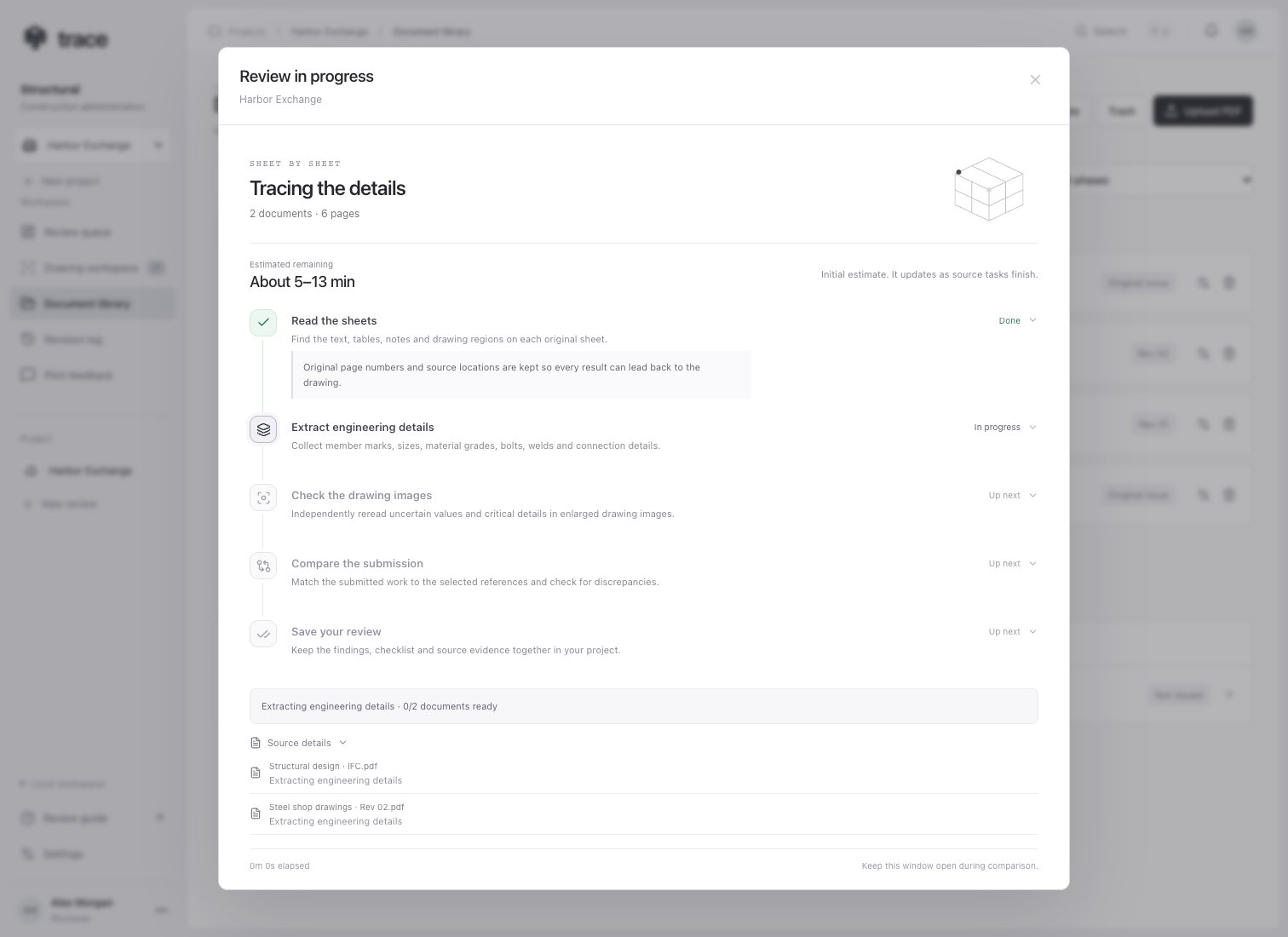
Choose the design reference, shop drawings and supporting sources in New review, then select AI document review and Start review. The hosted workspace has document reading enabled. Development installations without Reducto configuration send the original PDFs directly to OpenAI. With document reading enabled, an interactive progress window shows the active steps, their explanations, completed milestones, elapsed time and an estimated remaining range. Select a step to learn what it does, or expand Source details for each file. The estimate starts broad, uses saved timing history when available, and updates from measured image-task durations. It can change as drawing complexity becomes known. An overrun during comparison is labeled explicitly. Motion respects your device’s reduced-motion preference. The stages follow actual source progress; parallel documents can occupy different steps:- Reading documents: Reducto r-1 reads each PDF’s text, tables and figures, preserving original page numbers and source locations.
- Extracting engineering details: image-backed Deep Extract gathers sheet/revision details, member marks and sizes, connections, bolts, welds, plates, anchors, reinforcement and structural requirements.
- Checking drawing details: an independent visual pass rereads low-confidence fields and critical member, material, bolt, weld, plate, anchor and reinforcement values, including critical values with high extraction confidence. It sees original sheet images and enlarged tiles, field locations and tentative member labels. The target extracted answers are withheld. Shared source regions are grouped into bounded tasks.
- Reviewing: the AI compares this evidence with the original PDFs and the selected module’s checks.
Inspect the evidence
Finding highlights use uniquely matched source text with valid page coordinates. Scanned PDFs can receive highlights through Reducto’s reading results. Graphical or ambiguous evidence can still have a page citation without an exact highlight. Verify the original cited drawing and surrounding detail. Open Package & stamp → Review checks → Document reading to inspect each source’s page count, low-confidence fields and blocks, fields without source locations and pages with no extracted content. Relevant limits also appear in review coverage. An extracted value may be uncertain or have no source location. Trace retains that uncertainty for the engineer. Source confidence is a reading signal and does not establish structural correctness. Empty extracted lists do not establish that a required detail is absent.Retry a source
If reading fails, Trace displays the file and reason before AI comparison starts. Start the review again to retry. Already completed source extractions are reused, and an extraction retry reuses the earlier parse when available. Temporary provider outages preserve the existing job. If a provider job has expired or been removed, retrying restarts reading from the preserved original PDF. Original PDFs remain stored separately from annotations and extracted evidence. Provider API keys stay on the server. See storage, processing and limits for data handling and review boundaries.Inspect drawing checks
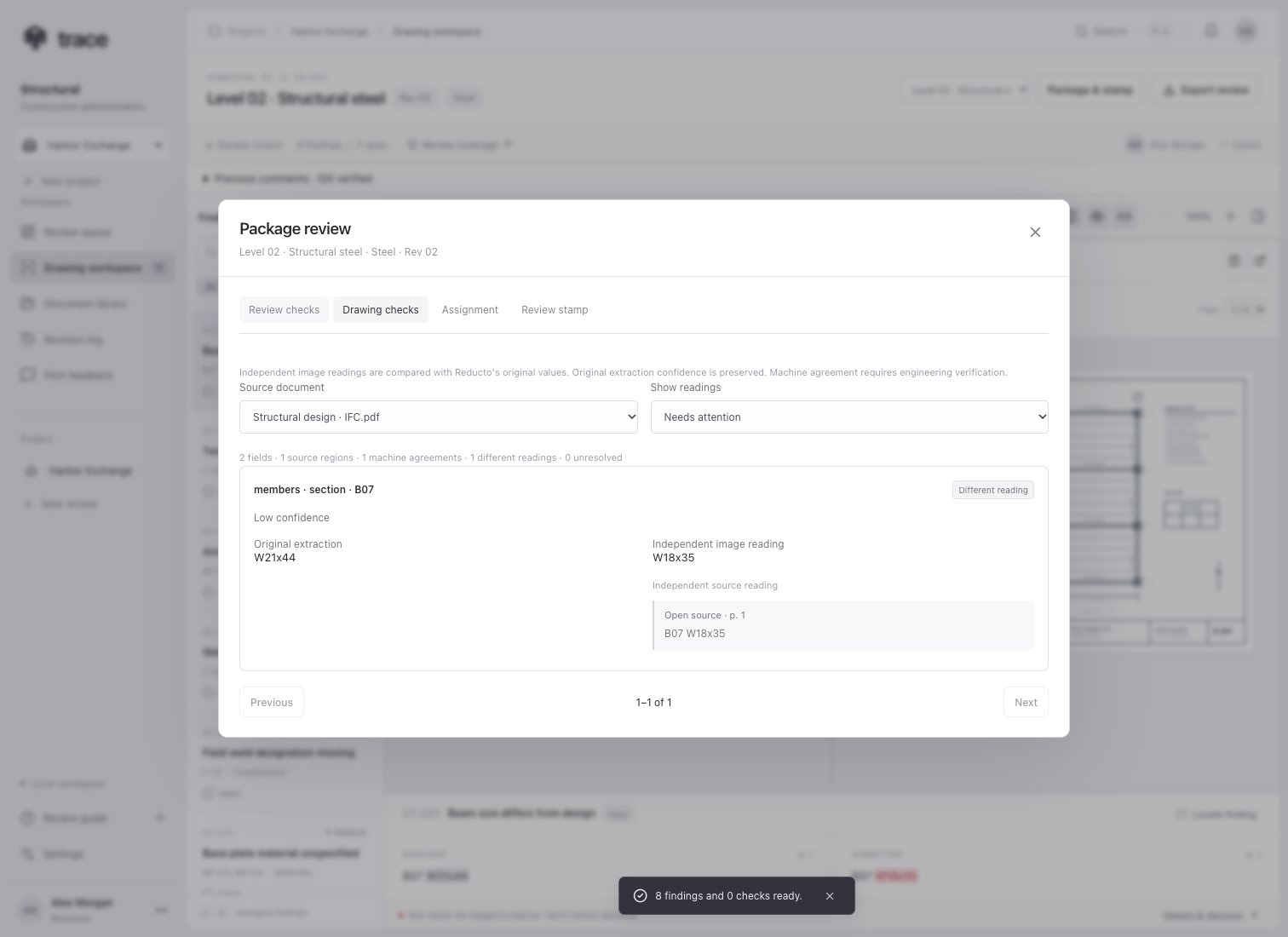
Open Package & stamp → Drawing checks. Choose a source and filter for Needs attention, Different reading, Unresolved, Machine agreement, or all readings. Each item keeps the original extracted value alongside independent image readings, reasons and a link to the original source page. Lists are paginated.- Machine agreement: all required source readings returned the same value after conservative formatting and numeric-fraction normalization.
- Different reading: at least one readable observation differs from the original extraction. Text differences can reflect wording or formatting and require interpretation.
- Unresolved: a source location, reliable reading or complete set of observations is unavailable.
Paused service access
If the review service reports unavailable credits, ask the workspace owner to replenish the OpenAI API balance, then start the review again. Completed Reducto reading is retained. Credit and rate-limit errors pause the visual task before later tasks are consumed; temporary rate limits include a saved cooldown. An explicit retry resumes unavailable image tasks and preserves successful readings.